How SheetScope AI works
What SheetScope AI does,step by step.
One real spreadsheet, followed from the first column to the last answer: AbujaMart’s export of 118 orders worth ₦6,773,300, with the customer names removed. At each step you see what goes in, what SheetScope AI does, what SheetScope’s own engine does, what comes out and where it stops.
- SheetScope AIsuggests, plans and writes words
- Fixed rulethe same code every time
- CalculatedSheetScope adds up your rows
Who does what,at a glance.
SheetScope AI has three jobs: suggest a column mapping, turn a question into a plan, and write a short summary. Everything else on this page is a fixed rule or a calculation. SheetScope AI never calculates a figure.
- orders in AbujaMart’s export
- 118orders in AbujaMart’s export
- sales value, calculated by SheetScope from the rows
- ₦6,773,300sales value, calculated by SheetScope from the rows
- jobs for SheetScope AI: columns, questions, summaries
- 3jobs for SheetScope AI: columns, questions, summaries
- figures calculated by SheetScope AI
- 0figures calculated by SheetScope AI
1 Reading the columns
Fixed ruleSheetScope AIYou decide
Rules guess first. SheetScope AI is asked only for what they miss. You confirm every choice.
2 The cleaning checks
Fixed ruleYou decide
Capitals, a return, rows with no price, missing order numbers, no dates. No AI.
3 The balance check
Calculated
Rows and totals found equal rows and totals included plus left out. No AI.
4 A question answered
SheetScope AICalculatedFixed rule
SheetScope AI makes a plan. The engine runs it. Code reads returns, missing names and “why” questions.
5 The written summary
SheetScope AIFixed rule
SheetScope AI writes it from calculated figures. A fixed check throws it out if a figure is not one of them.
AbujaMart’s real orders, customer names removed. July 2026 is the month AbujaMart gave; the export has no order dates. Its use in the demo doesn’t mean AbujaMart endorses SheetScope.
Which header is which,and who decided.
- What goes in
The file and sheet names, the 9 column names, what kind of value each column holds, how many rows are filled, the range of each number column and up to three short examples per column. Columns whose names look personal, such as name, phone, email, address, BVN or NIN, send no examples and no number range. Never the whole file, and never a row.
- Fixed rules go firstFixed rule
Built-in rules read the headers and make a first guess: OrderDate is a date, OrderTotal is the sales value, City is the city. On this file they found 7 fields without any AI.
- SheetScope AI, only for what they missSheetScope AI
On the import screen, SheetScope AI is asked once when the rules miss something important, such as no sales value or units column, or no product column. You can also press “Suggest the mapping”. It gets the rules’ first guess and the column facts above, and picks one column for each field, or none. Code then drops any column name it made up, and a column whose name looks personal is not used as a product, city or segment.
- You confirm every choiceYou decide
Each field shows as a drop-down. Nothing is used until you check it and continue.
- What comes out
A mapping: which column is the date, product, city, payment method, order number, units and sales value, how time is recorded and whether amounts are in thousands. Here: Sales value is OrderTotal, City is City, and the date column is empty on all 118 rows.
- Where it stops
A suggestion can be wrong or blank. In our test of 8 files, SheetScope AI alone got 123 of 126 key columns right (97.6%); the rules alone got 29 of 42; rules then SheetScope AI, the way the import screen uses them, got 123 of 126 (97.6%). That is why you confirm.
| Header in the file | Became | Fixed rules | SheetScope AI alone |
|---|---|---|---|
| OrderID | Order or invoice ID | Order or invoice ID | Order or invoice ID |
| City | City | City | City |
| ProductName | Product | Product | Product |
| Category | not used | not used | not used |
| Quantity | Units sold | Units sold | Units sold |
| Price | not used | not used | not used |
| OrderTotal | Sales value | Sales value | Sales value |
| OrderDate | Date | Date | not used |
| PaymentMethod | Payment method | Payment method | Payment method |
The fixed rules found 7 fields from the headers alone, with no AI. Category and Price are not fields the engine reads, so they are left out. We also asked SheetScope AI on its own, with no first guess: it found 6 fields and differed from the rules where the table shows two different entries, in 3.4 seconds. Rules first, then SheetScope AI, gave 6 fields, the same as the rules.
Notes SheetScope AI added for you to check: “OrderDate column contains only NULL values; no date information is available for time-based analysis.” “Quantity includes negative values (min -3), suggesting returns or adjustments that should be verified.” “Currency is not specified; values appear to be in a local currency (possibly Nigerian Naira based on city names) but ISO code cannot be confirmed.”
Cleaning is rules,not AI.
- What goes in
The rows of the file, as read. Not sent to any outside service.
- What the engine doesFixed rule
Fixed checks look at every row the same way every time: names that differ only in capitals, negative sales values, a quantity with no value, gaps in order numbers and an empty date column. A check that finds something writes a plain sentence, with the row count and examples.
- What you decideYou decide
Capital-letter merges are proposals and each can be switched off. Whether a return stays in is your choice. A missing order or price is never filled in.
- What comes out
A cleaning log. None of these notes changes a figure on its own: zero-value rows count as ₦0, the return stays in, and no missing order or price is guessed.
- Where it stops
Rules find what they were written to find. A mistake of a kind no rule covers, such as a price typed ten times too big, is not caught here.
What the review found in AbujaMart’s 118 rows
Fixed rule- Capital letters. 75 rows spell a city or payment method with different capitals: Port Harcourt (6 rows in other capitals), kaduna (2 rows in other capitals), Card (21 rows in other capitals), Transfer (30 rows in other capitals), Cash (16 rows in other capitals). Each is counted under one name unless you switch the merge off.
- A return. Order 41: Kano, Cooking Oil 5L, −3 units, −₦37,500. It stays in and reduces the totals unless you choose to leave it out.
- 12 rows with no price. Blender 1.5L 10 rows, Bar Soap Pack 2 rows; 52 units. They count as ₦0, as in the file. SheetScope does not guess a price.
- Missing order numbers. The file runs from 1 to 120, and order numbers 56 and 71 are not in it. If those orders exist, the export left them out.
- No order dates. OrderDate is empty on all 118 rows. Totals by product, city and payment method work; charts over time need dates.
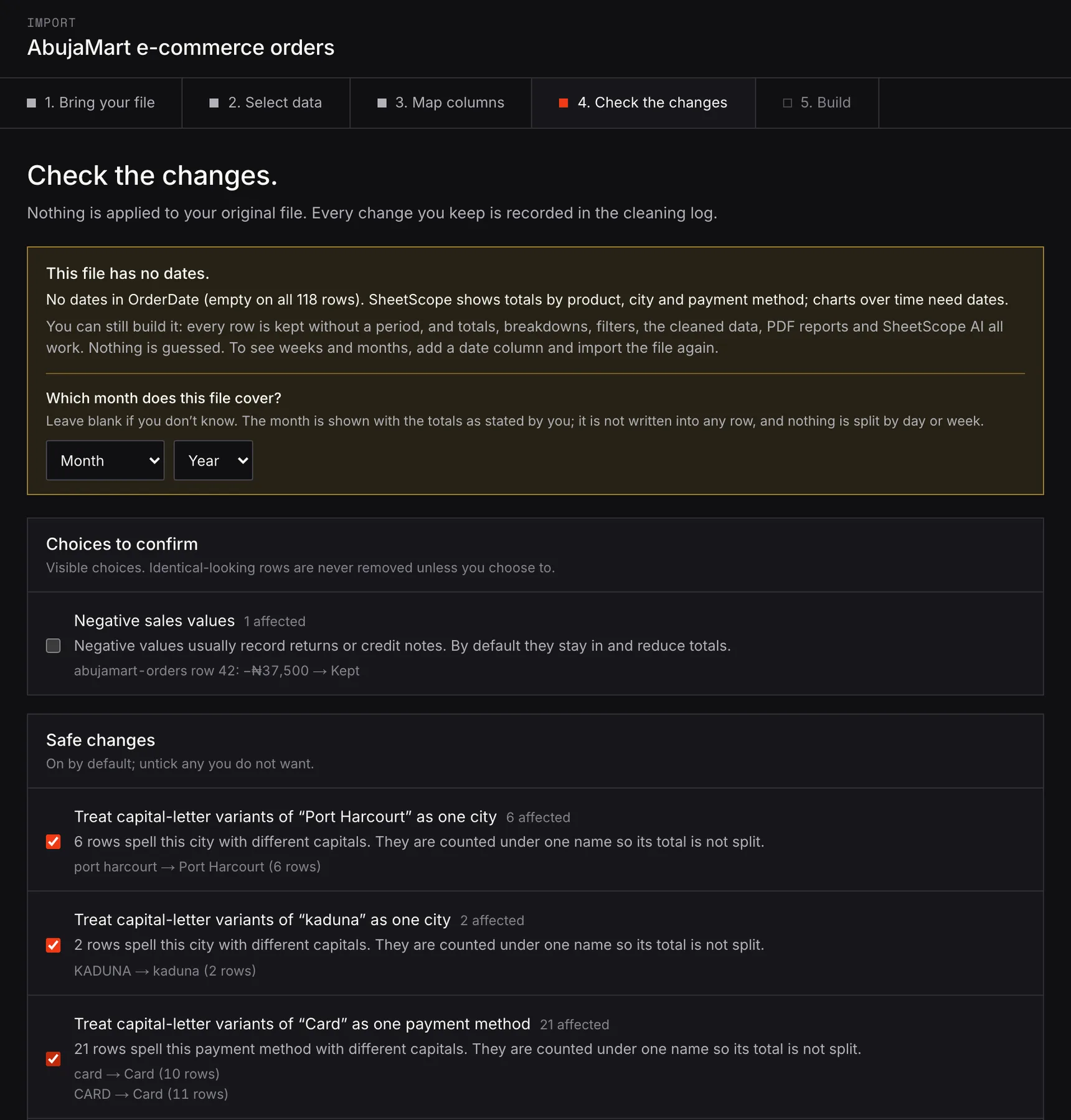
Screenshot of SheetScope on AbujaMart’s real orders
Every row accounted for,to the naira.
- What goes in
The rows of the file and the choices you made in the cleaning step.
- What the engine doesCalculated
It adds up the file’s own rows (118 rows, ₦6,773,300), then adds up the rows it kept. Rows found must equal rows included plus rows left out, and every row left out must have a reason. The saved data is then added up again, and a difference stops the build.
- What comes out
A balance you can read: 118 of 118 rows included, ₦6,773,300, 0 rows left out. The same figures print at the end of the PDF report.
- Where it stops
It proves that SheetScope’s figures match your file. It cannot show that your file has every sale, or that the numbers in it were right to begin with.
- Found in the file
- ₦6,773,300118 of 118 rows
- Included in the dashboard
- ₦6,773,300118 of 118 rows
- Left out
- ₦00 of 118 rows
CalculatedBalanced: 118 of 118 rows, ₦6,773,300.
From a questionto an answer with its working.
- Goes in
The question and the shape of your file
The question, the column names and periods, and the names that appear in the file: product and city names, and segment names such as payment methods when there are 30 or fewer. Never a row, never a figure, and never the values of a column whose name looks personal.
- Who does what
A plan, a calculation, then words
- SheetScope AIturns the question into a plan: what to measure, how to group it, which names are meant.
- Calculatedmatches names to the file’s own, runs the plan on the rows and writes the answer from the results.
- Fixed rulereads returns, time words on a file with no dates, “why” questions and names that are not in the file.
- Comes out
An answer that shows its working
The answer, a ranked list, a plan line saying the period, measure and grouping used, and, for a vague question, a “Read as” line that says how it was understood and how to ask for something else.
A question that asks for a cause is never given one. The answer says what changed and that a sales file cannot show why.
- Where it stops
Where a question can slip
Returns and time questions are routed by a list of words. A question that says it another way goes to SheetScope AI’s plan instead, and the evaluation lists every miss of that kind. A vague question is read one way, and the “Read as” line is how you ask again.
1 The question
You decide“Which city sold the most?”
Asked on AbujaMart’s orders. SheetScope AI sees this text, the column names, the periods, the 15 product names, the 8 city names and the 3 payment methods. No row and no figure.
2 The plan SheetScope AI made
SheetScope AIintent: ranking measure: amount dimension: branch mode: annual filters: {"product":[],"branch":[],"customer":[]} top_n: 1 order: desc reason: The dataset has no dates, so it covers the stated period (July 2026) as a whole.A plan, not an answer: what to calculate, never a figure. It took 2.8 seconds.
3 The calculation the engine ran
CalculatedAdd up the sales value of every row, group the rows by city (capital-letter variants counted as one), and sort from the highest to the lowest. All 118 rows, because the file has no dates to narrow by.
The engine’s top five cities by sales value City Sales value Share Port Harcourt ₦2,338,800 34.5% Abuja ₦958,900 14.2% Ibadan ₦906,800 13.4% Benin City ₦743,000 11.0% Enugu ₦670,000 9.9% 4 The answer
CalculatedPort Harcourt had the highest sales value among cities in July 2026: ₦2.3m, 34.5% of the total.
How this was calculated: July 2026 · sales value · by city
The month comes from AbujaMart; the export has no order dates.
The words are written by code from the engine’s results. SheetScope AI does not write the answer or any figure in it.
The same path for questions that are harder to read
Four more questions from our evaluation on release 38a1eae, each as one real run returned them, word for word. SheetScope reads the kinds of question that are easy to get wrong in code, not in SheetScope AI’s plan.
A vague question
SheetScope AIFixed rule“Which is best?”
Office Chair had the highest sales value among products in July 2026: ₦2.3m, 33.6% of the total.
- 1. Office Chair: ₦2.3m (33.6%)
- 2. Bag of Rice 50kg: ₦900,000 (13.3%)
- 3. Men's Sneakers: ₦814,000 (12.0%)
- 4. Ankara Fabric (6yds): ₦495,000 (7.3%)
- 5. Kids School Bag: ₦437,000 (6.5%)
- The month comes from AbujaMart; the export has no order dates.
- Read as: products ranked by sales value in July 2026, highest first. To ask for something else, name what you want, for example “sales for Port Harcourt”, “how much did Office Chair sell”, “top 3 products”.
SheetScope AI planned it. Code saw that nothing was named and read it in a default way, then added a “Read as” line.
A question about returns
Fixed rule“Were there any returns?”
Yes, there is 1 return in July 2026: −₦37,500. Returns are included in the totals, so every total is net of returns.
- Cooking Oil 5L · Kano · Cash: −₦37,500
- The month comes from AbujaMart; the export has no order dates.
Code read the word “return” and answered from the rows with a negative value. SheetScope AI was not asked.
A name that is not in the file
SheetScope AIFixed rule“How much did iPhone 15 sell?”
“iPhone 15” isn’t in this file. SheetScope shows no figure for a name it cannot find.
SheetScope AI planned it. Code then compared the name with the names in the file, found no match and said so, with no figure.
A “why” question
Fixed rule“Why is Port Harcourt the top city?”
SheetScope can’t say why. A sales file records what was sold, not the reasons behind it, and SheetScope does not guess. What the file does show: Port Harcourt had sales value of ₦2.3m in July 2026, 34.5% of the total. It can show totals and rankings by product, city and payment method.
- The month comes from AbujaMart; the export has no order dates.
Code read the word “why” and answered. SheetScope AI was not asked.
Written from figures,then checked against them.
- What goes in
Only the calculated figures and notes for the view on your screen: the period, the totals, the top items and the notes about the file. No rows and no file.
- What SheetScope AI doesSheetScope AI
Writes two to four plain sentences from those figures, copying each figure exactly, and up to three questions worth checking in your own records.
- What the fixed check doesFixed rule
Rejects the summary if any figure is not one of the calculated ones, if a currency symbol or sign is wrong, or if it gives a cause (because, due to, driven by). It allows one more try. If that fails too, the calculated summary is shown, labelled “Calculated summary”, and it uses no request.
- What comes out
A short summary you can paste into an update, plus the questions to check. The figures in it are SheetScope’s.
- Where it stops
The check reads figures and cause words, not meaning. A sentence can pass and still be dull or oddly stressed. In our test, 42 of 42 summaries passed the check the first time, 0 needed the retry and 0 fell back to the calculated summary.
SheetScope AI Whole file
Sales value in July 2026 was ₦6.8m across 118 orders totalling 427 units of 15 products. Office Chair was the largest product at ₦2.3m (33.6% of total), with the top three products making up 58.9% of sales. Port Harcourt led by city with ₦2.3m (34.5%), while Lagos had the least at ₦326,500. Card was the leading payment method at ₦2.6m (38.8%), with Cash the lowest at ₦1.7m.
Fixed rule The figure check
- 2026 is in the calculated facts
- ₦6.8m is in the calculated facts
- 118 is in the calculated facts
- 427 is in the calculated facts
- 15 is in the calculated facts
- ₦2.3m is in the calculated facts
- 33.6% is in the calculated facts
- 58.9% is in the calculated facts
- 34.5% is in the calculated facts
- ₦326,500 is in the calculated facts
- ₦2.6m is in the calculated facts
- 38.8% is in the calculated facts
- ₦1.7m is in the calculated facts
13 of 13 figures in this summary appear in the calculated facts. It passed the check the first time.
The calculated facts it was written from
Calculated- Period: July 2026
- Sales value: ₦6.8m
- Units sold: 427
- Products sold: 15
- Orders: 118
- Average order value: ₦57,401
It also suggested questions to check in your own records, phrased as questions, never as conclusions: “What dates do the 118 orders in this export actually cover?” “Were there any promotions, staffing changes, or stock issues affecting Office Chair or the top three products during this period?” “Did Port Harcourt have more operating days or different opening hours compared to Lagos in July?”
What leaves SheetScope,and what never does.
- Where it runs
In the European Union
SheetScope’s servers are in the European Union (Ireland), and requests to SheetScope AI are processed in the European Union. SheetScope moved its servers and SheetScope AI to a new model there; the model was chosen by measurement, not by price alone.
- What is kept
Answers stay with your project
Answers and summaries are saved with your project, so asking the same thing again sends no new request. We do not use your data to train AI models.
- Where it stops
The names are real names
Product, city and segment names do leave SheetScope when you ask a question, because the plan has to use them. If a name in your file is sensitive, do not put it in a product, city or segment column. AbujaMart’s customer names were removed from the file before it was published.
The privacy notice names the cloud provider and says where data is processed. Privacy notice
| Job | Sent | Never sent |
|---|---|---|
| Reading the columnsSheetScope AI | File and sheet names, the 9 column names, value types, counts, number ranges and up to three short examples per column. The rules’ first guess. | Any row. Examples and number ranges from columns whose names look personal (name, phone, email, address, BVN, NIN). |
| Answering a questionSheetScope AI | The question, the column names and periods, the 15 product names, the 8 city names, and the 3 payment methods (segment names are sent only when there are 30 or fewer). | Any row or figure. Values from a column whose name looks personal, such as Customer, Name, Phone or Email. |
| Writing a summarySheetScope AI | The calculated figures and notes already on your screen for the view you chose. | Any row, and anything that is not already a calculated figure. |
| Cleaning, balance, calculations, name matching, returns and the figure checkFixed rule | Nothing. They run on SheetScope’s own servers, on your rows. | Not applicable: no outside service is involved. |
Reading the columns
SheetScope AI- Sent
- File and sheet names, the 9 column names, value types, counts, number ranges and up to three short examples per column. The rules’ first guess.
- Never sent
- Any row. Examples and number ranges from columns whose names look personal (name, phone, email, address, BVN, NIN).
Answering a question
SheetScope AI- Sent
- The question, the column names and periods, the 15 product names, the 8 city names, and the 3 payment methods (segment names are sent only when there are 30 or fewer).
- Never sent
- Any row or figure. Values from a column whose name looks personal, such as Customer, Name, Phone or Email.
Writing a summary
SheetScope AI- Sent
- The calculated figures and notes already on your screen for the view you chose.
- Never sent
- Any row, and anything that is not already a calculated figure.
Cleaning, balance, calculations, name matching, returns and the figure check
Fixed rule- Sent
- Nothing. They run on SheetScope’s own servers, on your rows.
- Never sent
- Not applicable: no outside service is involved.
How well it works,measured.
We tested every job on AbujaMart’s real orders and four public sales files, three runs per question, on SheetScope release 38a1eae. The test calls used a different route to the same model version than live answers do, and only public data went through it. The full page shows every failed run, word for word.
- of 75 answers to questions nobody had seen while fixing faults passed (69 passed)
- 92.0%of 75 answers to questions nobody had seen while fixing faults passed (69 passed)
- of 102 answers to the original questions passed (102 passed). The optimistic number.
- 100.0%of 102 answers to the original questions passed (102 passed). The optimistic number.
- summaries passed the figure check the first time
- 42 of 42summaries passed the figure check the first time
- key columns mapped right by the rules and SheetScope AI together
- 123 of 126key columns mapped right by the rules and SheetScope AI together
How long each kind of request took
The median is the middle time: half the requests were faster. It is the time SheetScope AI itself took in this run. It leaves out the waiting added to keep within our account’s limit on requests a minute. Requests that fixed rules answered without SheetScope AI are timed by the whole request.
| Kind of request | Requests | Median | Slowest |
|---|---|---|---|
| Question that SheetScope AI planned | 48 | 1.8 seconds | 2.8 seconds |
| Question answered by fixed rules, no AI call | 54 | 51 ms | 76 ms |
| Written summary | 42 | 2.6 seconds | 7.6 seconds |
| Column reading, SheetScope AI alone | 24 | 3.5 seconds | 7.1 seconds |
| Column reading, rules then SheetScope AI | 24 | 3.3 seconds | 6.7 seconds |
Every result and every failureWhat SheetScope AI receivesHow SheetScope reads a file
See it on real orders.Then on your own file.
Ask AbujaMart’s orders a question in the demo, or bring one sales file of your own. Every figure comes from your rows.